
Check a household's tasks
See every task linked to one household, grouped by the meeting it came from, so you can check what is still to do before you next speak with the client.
Open the household's tasks
- In the sidebar, select Clients, then Households.
- Select the household.
- Select the Tasks tab.
The tab lists the household's open tasks. Tasks from the same meeting are grouped under the meeting's name. Tasks that are not linked to a meeting are grouped under Other. Beside each group name, a count such as 0/2 shows how many of the group's tasks are complete, out of the tasks listed.
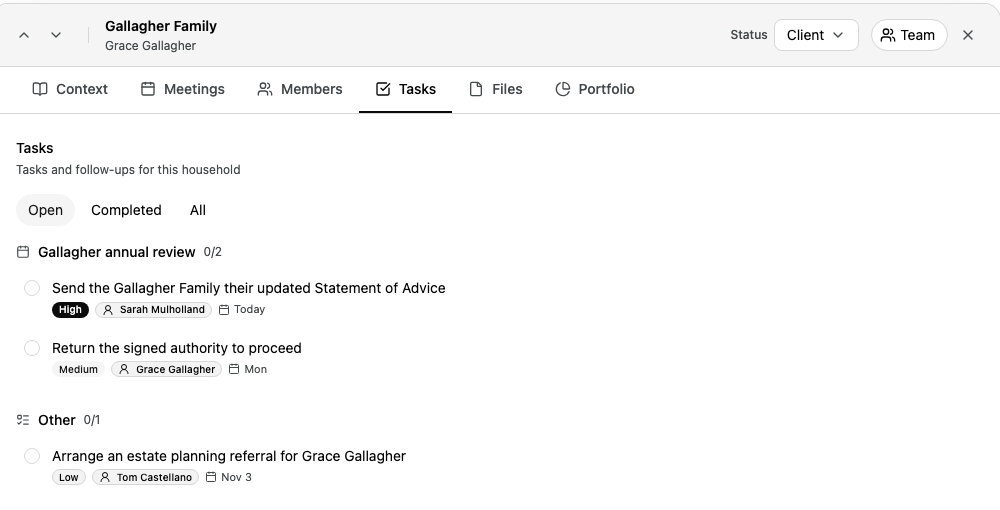
To see completed tasks, select Completed. To see every task, select All.
Work with a task
You change a task here the same way as on the Tasks page.
- Select the circle to complete a task. Select the tick to reopen it.
- Select the title, priority, due date or assignee to change it.
- Point to a task and select the bin button to delete it. Select Undo within 5 seconds to keep it.
When you change the assignee of a task from a meeting, the people from your organisation who were in that meeting show first, under Participants. You can also search for anyone else in your organisation.
For each step in detail, see Manage your tasks.
The Tasks tab has no button to add a task. A task you add on the Tasks page is not linked to a household, so it does not show here.